Resources Review your draft
Start with the review page
Where the review page opens, what’s on it, and how a round works.
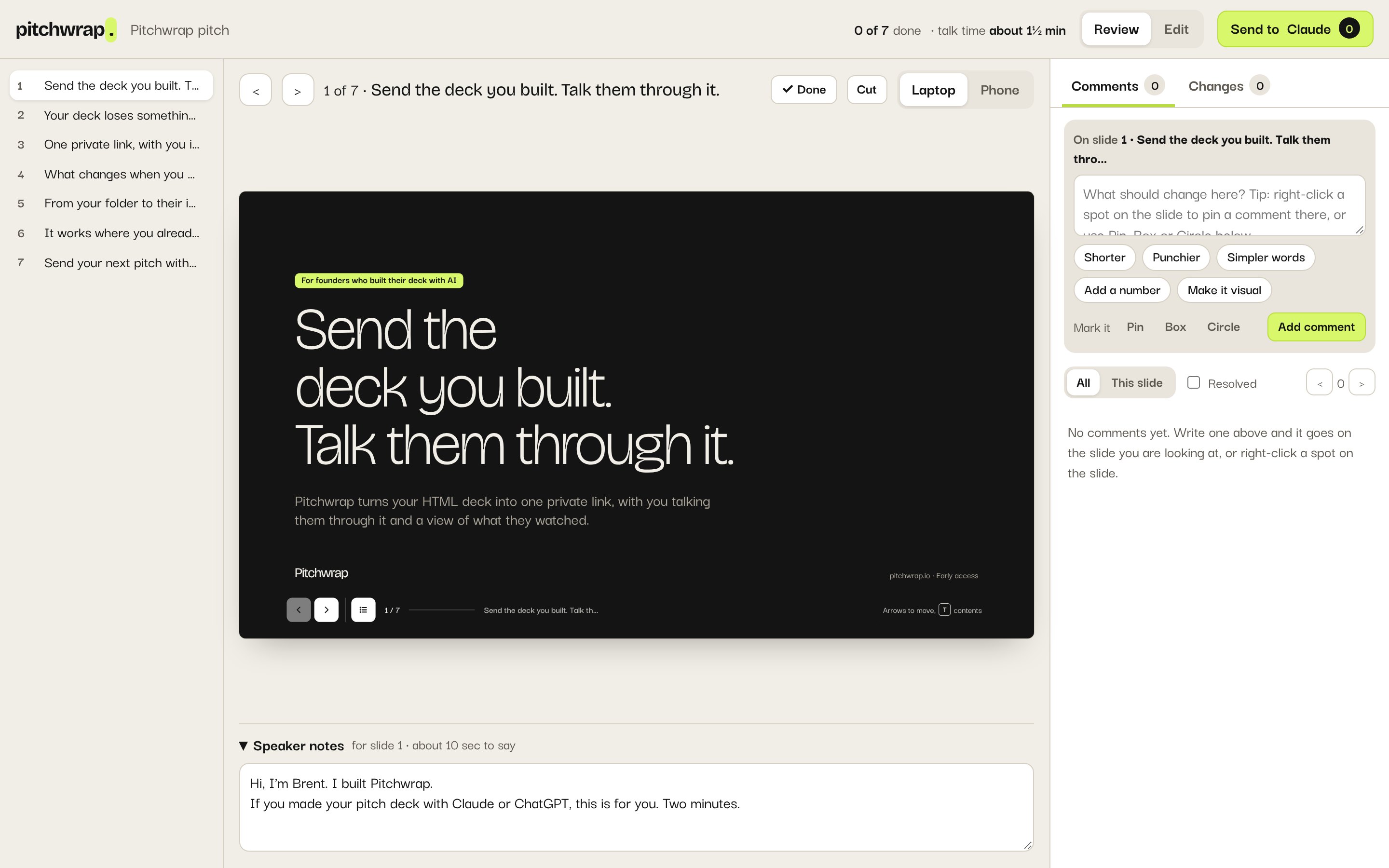
The Builder Coach shows each draft of your deck in a review page, where you comment, make small edits and send it all back in one message.
Open it
- Claude: it opens as an artifact beside the chat.
- ChatGPT: it opens as a canvas.
- Claude Code or Codex: open the
review.htmlfile it saves.
If it’s blank, tell the Coach “the review page didn’t load” and it shows a plain version.
Find your way around
- Left: your slides. Click one to go there.
- Middle: the deck, with Laptop and Phone sizes, and its speaker notes underneath.
- Right: Comments, and Changes you made yourself.
- Top: Review or Edit, and Send to Claude.
One round
Comment on what should change.
Edit the small things yourself.
Mark slides done, cut or reordered.
Send the round and get the next draft.
Your review is saved in this browser, for this draft, until you send it.